Migrating Self-managed Milvus to Managed Milvus to gain >99% Performance
So you've built an application using Milvus as the vector database, using Standalone or Distributed. You've reached a point where the application is working, customers are using it and the data volume is growing. At some point managing the vector database starts consuming more time, pod failures cause service jitter, you're running out of RAM on the server, or etcd becomes a painful bottleneck.
At this stage you're probably exploring a managed service to take the operational burden away. The good news is that migrating from Milvus to Zilliz Cloud is straightforward, and the various options are well documented.
In my case, I had built a simple Wikipedia RAG application: 50M embeddings using Cohere's Embed v3 multi-lingual model at 1,024 dimensions (covering the entire Wikipedia English corpus). Initially I hosted this on my laptop using Milvus Standalone, but the container was unstable and restarts took ~20 minutes - not ideal when you want to show a demo!
Query performance was also suffering due to frequent paging (I don't have enough memory on my laptop, so I enabled mmap). Below is a quick video showing the application in action:
Three second query times aren't great, so without the budget for a new laptop, I planned my migration to managed Milvus on Zilliz Cloud. The following is the step-by-step process I followed - there are a number of methods available, but I chose backup / restore for simplicity.
Create a backupPermalink to this heading
Zilliz provides the milvus-backup utility, and installing it is as easy as brew install milvus-backup
You then need to create a config file (milvus-backup looks for backup.yaml in the current working directory by default). This is a minimal example to create a backup from Standalone running in Docker locally (see the full yaml options on GitHub):
milvus:
  address: localhost
  port: 19530
  user: "root"
  password: "Milvus"
  tlsMode: 0
  etcd:
    endpoints: 127.0.0.1:2379
    rootPath: "by-dev"
minio:
  storageType: "local"
  rootPath: "/../milvus_wikipedia/volumes/milvus/data"
  backupStorageType: "local"
  backupRootPath: "/../milvus-backup-test/backup"
Then run a quick check:
$ milvus-backup check

Milvus version: 2.6.2
Storage:
  milvus-storage-type: local
  milvus-bucket: a-bucket
  milvus-rootpath: /../milvus_wikipedia/volumes/milvus/data
  backup-storage-type: local
  backup-bucket: a-bucket
  backup-rootpath: /../milvus-backup-test/backup

Success!
And finally create the backup (this will take a little time):
milvus-backup create -n wiki_backupCreate the target instance on Zilliz CloudPermalink to this heading
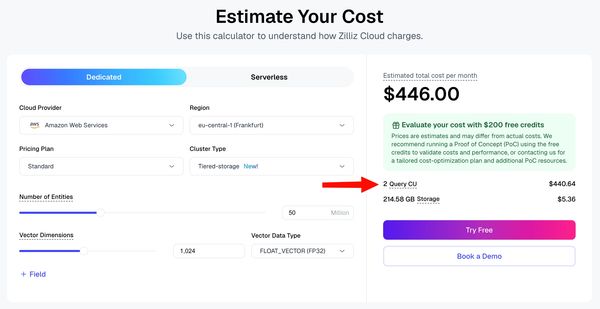
First make sure you have a Zilliz Cloud account - then create an instance that matches the minimum requirements of your local deployment. For my 50M x 1,024-D embeddings on Tiered-Storage, the public calculator estimated that I required 2 Query CU:
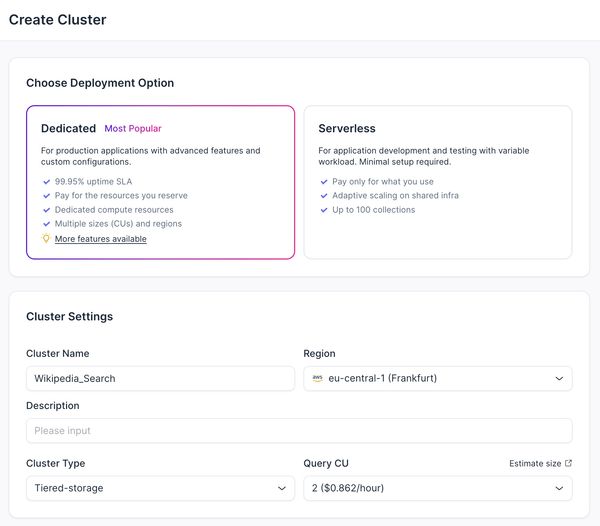
So I navigated to the cloud console, clicked "+ Cluster" and used these settings:
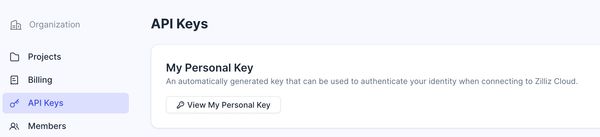
While it is creating, you can retrieve / generate the API key we will need for the next step:
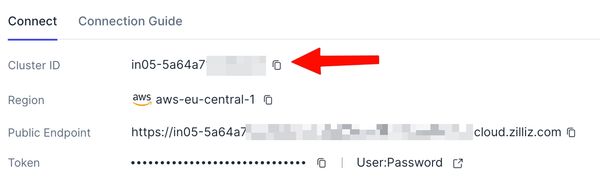
And note the cluster ID of the new instance:
Migrate to ZillizPermalink to this heading
Update your backup.yaml to include the cloud key you just generated / retrieved:
cloud:
  address: https://api.cloud.zilliz.com
  apikey: <your-api-key>
Then finally we just need to run one migration command, with the backup name and the target cluster ID passed as arguments:
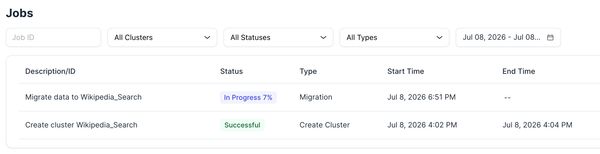
milvus-backup migrate -n wiki_backup -c <your-cluster-id>In my case it took a few hours to upload the ~120GB backup file to a Volume on Zilliz Cloud, then about an hour to create the target cluster from the Volume. You can monitor the migration status in the Zilliz Cloud console under Jobs:
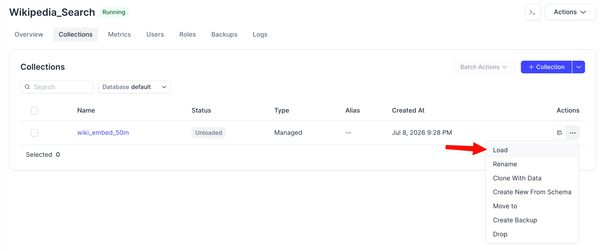
Once the migration is complete, make sure you load the collection into the cluster!
ValidationPermalink to this heading
Now you can simply update the application to use the new cluster endpoint and credentials.
We observe a performance improvement compared to Milvus Standalone - 25ms compared to 3,112ms - that's over a 99% latency reduction!. This is partly due to the increased compute allocated in the cloud service, as well as the proprietary index engine in Zilliz Cloud - Cardinal - which can achieve 10x faster queries compared to Milvus OSS.
The performance win is huge, but even better I no longer need to worry about the container stopping and I can free up ~20GB RAM on my laptop!
Other considerationsPermalink to this heading
-
If your application isn't running 24x7, your vector database doesn't need to either. Suspend inactive clusters to drop the compute cost to zero when it is not being used.
-
Tiered-Storage is a great cluster type for low (<10 QPS) requirements, but there are other options and you can migrate data between them:
-
On-Demand - only uses compute when there are queries being run. This could drop the cost by 99%, depending on the frequency of queries, at a cost of higher cold-start latency.
-
Capacity-Optimized - provides reduced data density compared to Tiered-Storage, but achieves 10x greater throughput and 2-5x faster queries. This would increase the compute cost of my example by about 60%.
-
Performance-Optimized - provides even greater throughput (>1,000 QPS per replica) and performance (10-100x faster) at the cost of further reduced data density.
-
-
Zilliz Cloud supports mounting external volumes from Google Cloud Storage, Amazon S3, Azure Blob Storage etc. So a cleaner approach would be to upload the backup directly to cloud storage and restoring it from there.
-
If creating / restoring a backup is not possible for any reason, and the Milvus deployment can be made accessible publicly - you can use the Migrate from Milvus Endpoint feature in Zilliz Cloud.
-
Everything we performed in Zilliz Cloud can be managed via API and/or Terraform if click-ops is not your preferred methodology.